AI Customer Feedback Summary on the Dashboard
AI Customer Feedback Summary on the Dashboard
The AI Customer Feedback Summary on your Dashboard gives you a short, plain-English overview of what your customers are saying, without you having to read every review.
Before you start
- The summary needs at least 1 review in the chosen time period. New locations with no reviews yet will see an "Insufficient Data" message instead.
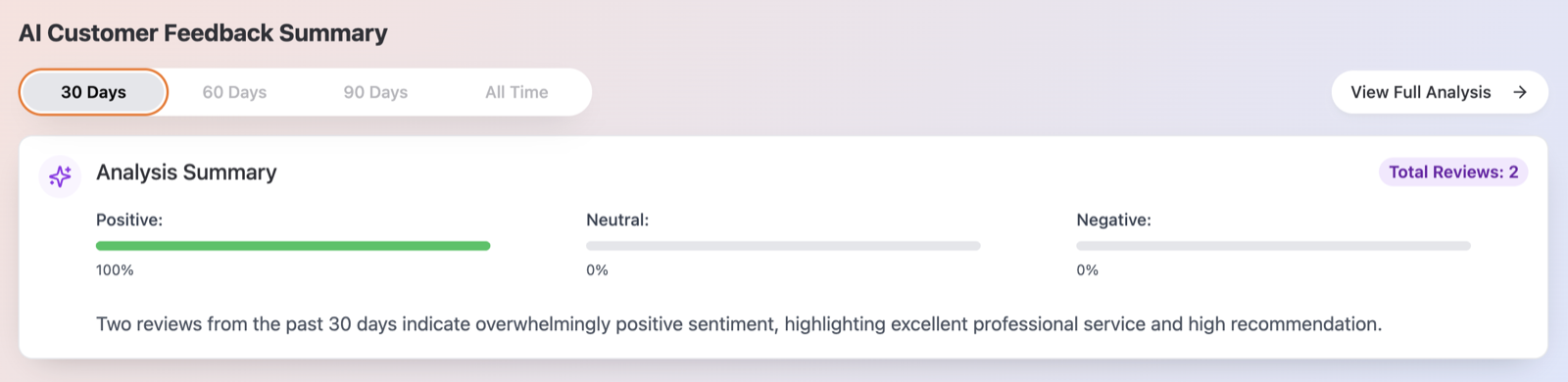
How to read it
- On the Dashboard, scroll down to AI Customer Feedback Summary.
- Pick a time period tab: 30 Days, 60 Days, 90 Days or All Time.
- Read the Analysis Summary card:
- The Total Reviews: N badge tells you how many reviews the summary is based on.
- The sentiment bars — Positive:, Neutral: and Negative: — show the mood split as percentages.
- Below them, an AI-written paragraph summarizes the main themes in your customers' feedback.
- Want the full breakdown with recommended actions? Click View Full Analysis to open the Review Insights page.
How often it updates
The summary is generated by AI at most once per day for each location. If you open the Dashboard again later the same day, you'll see the same summary — it will refresh with new reviews the next day.
The very first time a location loads, you may briefly see Syncing your data... while Qrese pulls in your reviews.
Tips
- Use the 30 Days tab to catch recent shifts in customer mood, and 90 Days or All Time for the bigger picture.
- If your location has fewer than about 90 reviews in total, the All Time tab shows the summary for the longest period that has data — so it may look identical to the 90 Days tab. That's expected.
- The sentiment bars are a quick health check: a growing Negative: bar on the 30-day tab is your cue to open View Full Analysis and see what's driving it.
Troubleshooting
- "Insufficient Data for Analysis" — the selected period has no reviews. The card explains: "We need at least 1 reviews to generate a comprehensive AI analysis for this time period." Try a longer period, or check back once new reviews come in.
- The summary hasn't changed after new reviews arrived — that's normal within the same day. The AI refreshes the summary once per day per location.